
AI Assistant
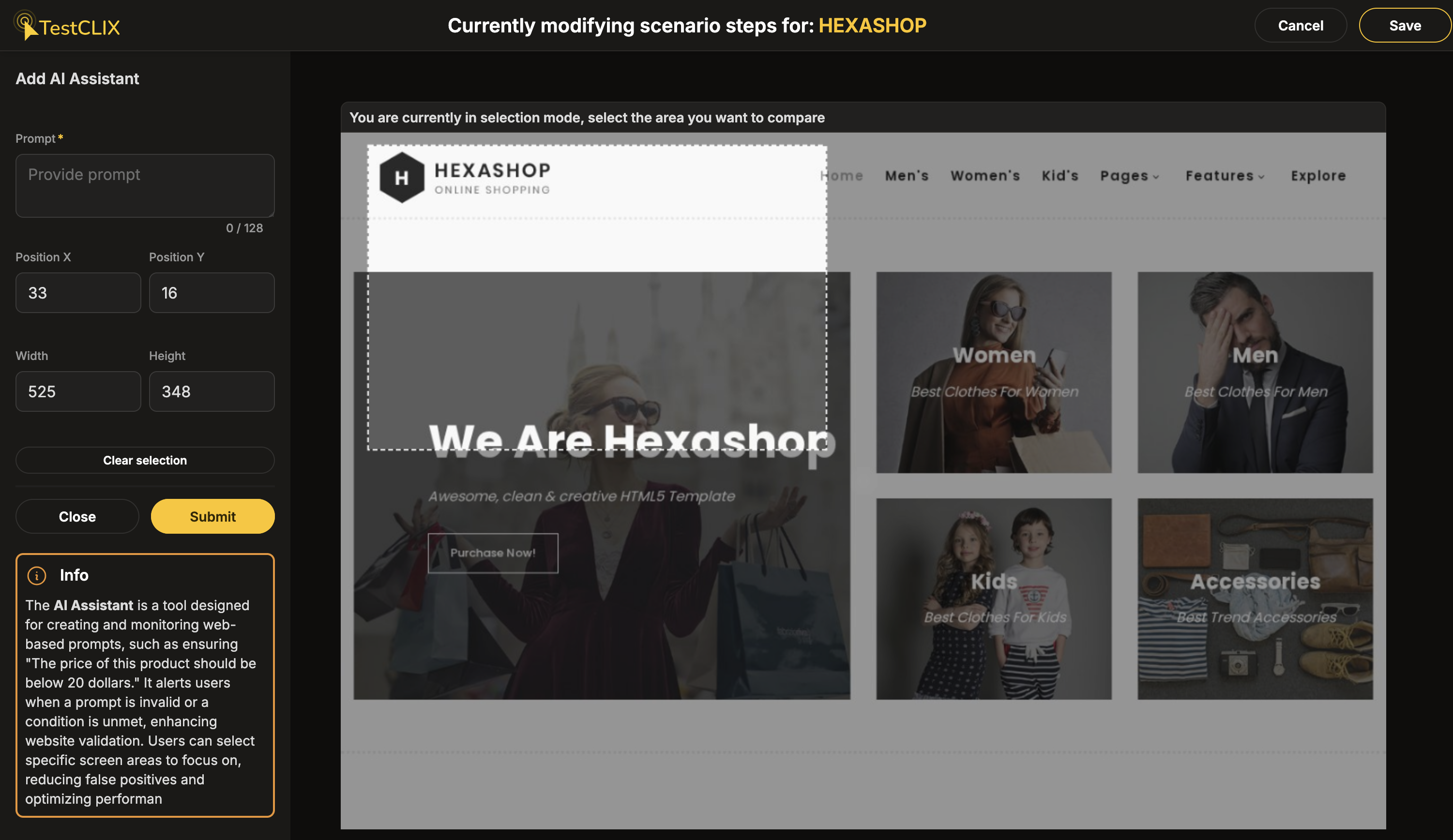
The AI Assistant lets you add verification steps written in plain human language instead of code or complex expressions. You describe what should be true about a part of the page, and an LLM evaluates whether the statement is met during playback.
No programming knowledge is required - anyone can create meaningful verification steps in seconds by describing the expected outcome in plain words.
How to add an AI Assistant check
Section titled “How to add an AI Assistant check”- In the recorder, make sure you are in Live mode.
- Right-click anywhere on the recorded browser window. A context menu with available actions will appear.
- Select AI Assistant.
- Draw a rectangle around the region you want to verify.
- Write a prompt - a statement that should be true about that region.
- Click Submit to confirm.
How it works
Section titled “How it works”During playback, TestCLIX captures the selected area and asks an LLM to determine whether the statement is satisfied or not.
The check works on both text and visual content. The LLM sees a screenshot of the selected region, so it can evaluate text, images, charts, colours, layout, and anything else visible on the screen.
Writing good prompts
Section titled “Writing good prompts”The best prompts are statements that clearly evaluate to a positive or negative outcome. For example:
- “The price is between 10 and 20” - if the displayed price is 15, the LLM confirms the statement is met. If the price is 30, the LLM reports it as false.
- “The shopping cart icon shows 3 items” - the LLM checks the visual indicator in the selected region.
- “The status badge is green” - works because the LLM can see colours in the screenshot.
- “The chart shows an upward trend” - works on visual content, not just text.
Avoid vague or open-ended prompts like “Does the page look correct?” - these give the LLM too little to work with.
Best used for
Section titled “Best used for”- Verifying dynamic values that change between runs (e.g., “The total is greater than 0”)
- Checking visual states that are hard to capture with pixel comparison (e.g., “The button is red”)
- Creating meaningful checks without writing code or learning a query language
- Validating content in images, charts, or non-text elements
Common errors
Section titled “Common errors”| Error | Meaning | What to do |
|---|---|---|
| AI Assistant concluded that assumption in prompt isn’t met | The LLM determined the statement is not satisfied. | Review the prompt and the current page state. The content may have changed since recording. |
Caveats
Section titled “Caveats”- Keep the prompt short and specific - the maximum prompt length is 128 characters.
- Choose a stable screen region. If the region captures the wrong part of the page after a layout change, the check may fail or produce misleading results.
- LLMs are not fully deterministic. If you notice a test is flaky on an AI Assistant step, try refining the prompt to be more specific and unambiguous.
For exact visual matching instead of language-based checks, see Compare Screen Fragment. To verify that video or animated content is playing, see Movie Checker.