Emails
Introduction
Section titled “Introduction”Use Notifications settings to control whether TestCLIX sends email notifications about system events.
You can manage two types of notifications:
- Failure notifications – Sent when a scenario execution fails.
- Invoice notifications – Sent when a new invoice is issued.
Failure Notifications
Section titled “Failure Notifications”Failure notifications inform you when a scenario execution status transitions to Error.
When they are enabled, the system automatically sends an email each time a scenario’s status changes to error. If the scenario is already in an error state, no additional emails are sent — a notification is only triggered on the transition to error. The notification is sent from address: test+<test_id>@portal.testclix.com.
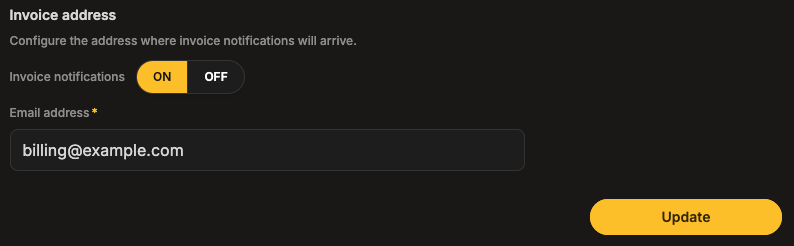
The notification is sent to the account registration email address (the email used when creating the account). This address is read-only in this section.
Default Settings
Section titled “Default Settings”- Failure notifications: ON
- Email address: Account registration email (read-only)
Configuration
Section titled “Configuration”You can enable and manage Failure notifications from the application Settings.
-
Open Settings from the left sidebar menu.
-
Select Notifications.
-
In the Failure notification section, ensure Failure notifications are set to ON (enabled by default).
-
Click Update to apply your changes.
Invoice Notifications
Section titled “Invoice Notifications”Invoice notifications inform you when a new invoice is issued.
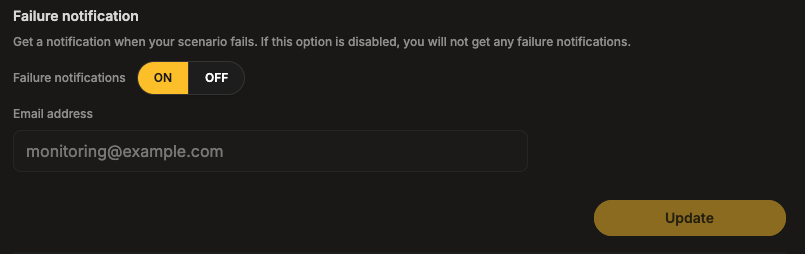
By default, invoice notifications are sent to the account registration email address (the email used when creating the account). However, this address can be changed in this section if you want invoices to be delivered to a different email.
Default Settings
Section titled “Default Settings”- Invoice notifications: OFF
- Email address: Account registration email
Configuration
Section titled “Configuration”You can enable and manage Invoice address from the application Settings.
-
Open Settings from the left sidebar menu.
-
Select Notifications.
-
In the Invoice address section, turn Invoice notifications ON.
-
Enter the Email address where invoice notifications should be delivered.
-
Click Update to apply your changes.