

Troubleshooting
Introduction
Section titled “Introduction”Deleting a secret does not delete the references to it. Extra headers and recorded steps that pointed at the deleted secret keep their reference and become invalid, so TestCLIX surfaces them wherever they would otherwise fail silently:
| Where you see it | What it looks like |
|---|---|
| Test configuration | The header value field shows “Secret deleted” and the test cannot be saved |
| Test details page | A red Deleted secret banner with an “Edit extra headers” button |
| Opening the recorder | The session is blocked with “Extra headers reference a deleted secret” |
| Recorder timeline | The step shows “Secret deleted” in red instead of the secret name |
| Player timeline | Steps that reference the deleted secret are highlighted as broken |
”Secret deleted” in a Header Value
Section titled “”Secret deleted” in a Header Value”What you see
Section titled “What you see”While editing extra headers, the Value field shows “Secret deleted” where the secret’s name would normally be, with the error beneath it:
“Secret no longer exists”
The error appears as soon as the dialog opens, without you touching the field. The row is marked invalid, and the test cannot be saved while it is in that state.
Why it happens
Section titled “Why it happens”The header referenced a stored secret that has since been deleted from the project. The reference survived the deletion; the value it pointed at did not.
How to fix it
Section titled “How to fix it”-
Open the Extra headers section of the test - see the extra headers page for Website Scenario, Website Availability, or Website Vitals.
-
Find the row showing “Secret deleted”.
-
Choose one of the following:
- Pick a replacement secret - select one from the secret picker on that row. If the value was rotated into a new secret, choose that one. If the secret you need does not exist yet, create it on the Secrets tab in Settings first, then come back and pick it here.
- Use Text instead - set the row’s source dropdown to Text and type the value. Note that a Text value is stored as plain text in the test configuration.
-
Save the test.
The row stops being invalid as soon as it points at an existing secret or holds a valid Text value.
”Deleted secret” Banner on a Test
Section titled “”Deleted secret” Banner on a Test”What you see
Section titled “What you see”A red banner at the top of the test details page, titled Deleted secret - or Deleted secrets when more than one header is affected. It names the header:
“Extra header
<header name>references a deleted secret. Recording and execution will fail until it is updated.”
For Website Availability and Website Vitals tests the wording is “Execution will fail…”, because those tests have no recording step.

Why it happens
Section titled “Why it happens”The test still references a secret that was deleted from the project. The banner lists the header names so you know which rows to repair.
How to fix it
Section titled “How to fix it”-
On the test details page, click “Edit extra headers” in the banner. This opens the edit dialog.
-
Fix each header that shows “Secret deleted”, as described in the previous section.
-
Save the test.
The banner disappears once no header in the test references a deleted secret.
The Recorder Will Not Start
Section titled “The Recorder Will Not Start”What you see
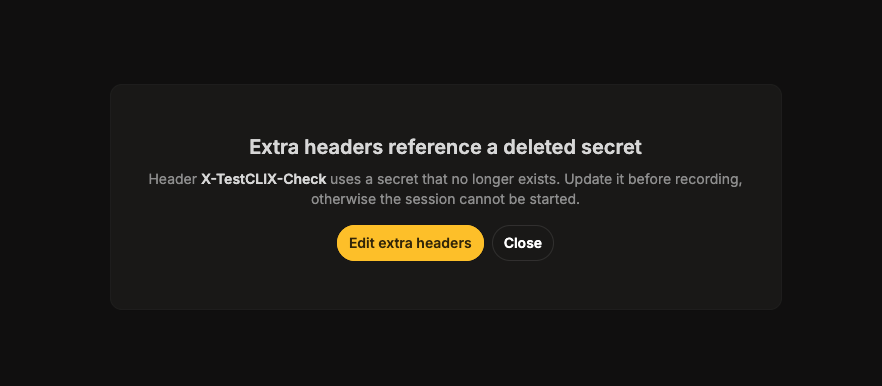
Section titled “What you see”Opening the recorder on a scenario whose extra headers reference a deleted secret is blocked before the session starts. The recorder shows “Extra headers reference a deleted secret” and:
“Header <name> uses a secret that no longer exists. Update it before recording, otherwise the session cannot be started.”
When more than one header is affected, the wording becomes “Headers … use a secret that no longer exists. Update them …”.
Why it happens
Section titled “Why it happens”The scenario cannot be recorded while one of its headers points at a secret that cannot be resolved.
How to fix it
Section titled “How to fix it”-
Click “Edit extra headers” in the message to open the edit dialog.
-
Fix each header that shows “Secret deleted”, as described in the first section.
-
Save the test, then start the recorder again.
Broken Steps in the Player Timeline
Section titled “Broken Steps in the Player Timeline”What you see
Section titled “What you see”In the Session Player timeline, steps that reference a deleted secret are highlighted as broken instead of showing a secret name.
Why it happens
Section titled “Why it happens”The step - an Insert secret or an OATH step - points at a secret that no longer exists, so there is no name left to display and no value to resolve at run time.
How to fix it
Section titled “How to fix it”-
Open the scenario, click the three-dot menu and select Modify scenario steps. This opens the scenario in the Codeless Recorder.
-
Select the broken step in the timeline. In the recorder it shows “Secret deleted” in red instead of the secret name.
-
On the Options tab of the step’s details panel, pick a replacement secret and click “Save secret” - see Change a Step’s Secret.
-
Save the scenario.
Avoiding the Problem
Section titled “Avoiding the Problem”- Before deleting a secret, check which tests reference it. The Delete secret dialog warns that “Anything that references this secret will stop resolving its value”, but it does not list what those references are, and deletion is not blocked by them.
- To rotate a value, replace the value of the existing secret instead of deleting it and creating a new one. Replacing keeps every reference intact.
- Only delete secrets to free up room against the 50-per-project limit, and prefer ones you know are unused.
Related
Section titled “Related”Can I recover a deleted secret?
No.
Stored values are write-only and cannot be read back, so a deleted value is gone for good.
You can create a new secret and point the affected headers and steps at it, but you have to supply the value yourself from your own records. Note that a broken header does not show the deleted secret’s name either - it shows “Secret deleted” instead - so you may also need to find out which secret it was before you can replace it.
Wasn’t I warned when I deleted the secret?
The Delete secret dialog warns that anything referencing the secret will stop resolving its value, but it does not tell you which tests those are, and it does not block the deletion. The specific references are reported only afterwards, on the test details page and in the player timeline.
I fixed the header but the banner is still there.
The banner clears only when no header in the test references a deleted secret. If the title read Deleted secrets (plural), more than one header is affected - check the remaining rows.