
API
Introduction
Section titled “Introduction”The TestCLIX API allows you to integrate external systems with your workspace. Access to the API requires a valid API Key.
Authentication
Section titled “Authentication”All API requests must include your API key in the request header:
x-api-key: YOUR_API_KEYExample
Section titled “Example”curl https://api.testclix.com/v1/api/status -H "x-api-key: {YOUR_API_KEY}"If the key is missing the API returns:
401 Response
Section titled “401 Response”{ "message": "Unauthorized"}If the key is invalid the API returns:
403 Response
Section titled “403 Response”{ "message": "User is not authorized to access this resource with an explicit deny in an identity-based policy"}API Key Management
Section titled “API Key Management”The API key is scoped to the currently selected project, and managing it requires the Admin or Owner role - see Roles & Permissions.
To manage your API key:
-
Open Settings from the left sidebar.
-
Navigate to Your API Key.
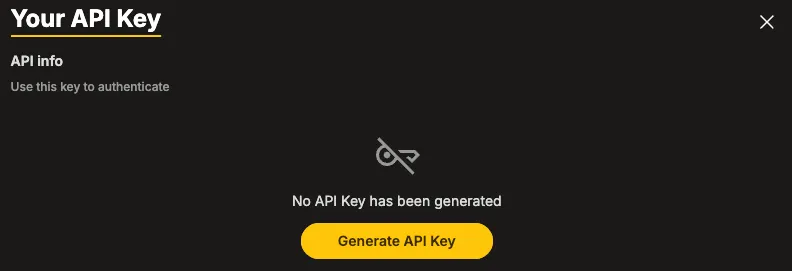
When accessing the API section for the first time, no key is available.
- Message: “No API Key has been generated”
- Button: Generate API Key
Generate a New API Key
Section titled “Generate a New API Key”-
Click the Generate API Key button.
-
The system automatically creates a unique API key for your workspace.
-
The API key and API URL are displayed.
-
Copy and securely store the API key.
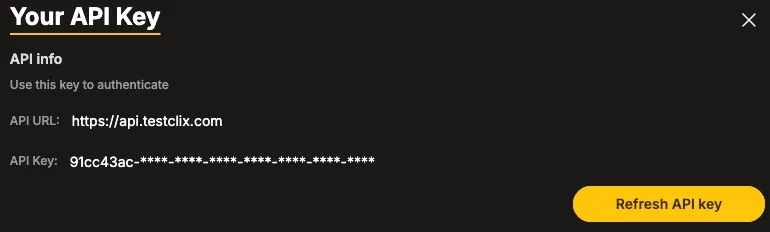
If an API key has already been generated, the panel displays:
-
API URL
-
Masked API Key
-
Refresh API Key button
Refreshing the API Key
Section titled “Refreshing the API Key”If your API key has been compromised or needs to be rotated:
-
Click the Refresh API key button.
-
Confirm the action.
-
A new API key is generated.
-
Update all external systems using the old key.
Endpoints
Section titled “Endpoints”Available endpoints.
| Method | Endpoint | Description | Params | Codes |
|---|---|---|---|---|
GET | /v1/api/status | Get test status | None | 200 |
GET | /v1/api/status/details | Get test details | None | 200 |
GET | /v1/api/status/{test_id} | Get test status by ID | test_id(string) | 200, 404 |
POST | /v1/api/execute/{test_id} | Execute test by ID | test_id(string) | 200, 403, 404 |
Get Test Status
Section titled “Get Test Status”GET /v1/api/status
Returns overall test status.
Example Request
Section titled “Example Request”curl https://api.testclix.com/v1/api/status -H "x-api-key: {YOUR_API_KEY}"200 Response
Section titled “200 Response”{ "status": "pass"}Get Test Details
Section titled “Get Test Details”GET /v1/api/status/details
Returns detailed test results.
Example Request
Section titled “Example Request”curl https://api.testclix.com/v1/api/status/details -H "x-api-key: {YOUR_API_KEY}"200 Response
Section titled “200 Response”{ "status": "pass", "tests": { "error": { "count": 0, "items": [] } }}Get Test Status by ID
Section titled “Get Test Status by ID”GET /v1/api/status/{test_id}
Returns status of a specific test.
Path Parameter
Section titled “Path Parameter”| Name | Type | Description |
|---|---|---|
| test_id | string | Test ID |
Example Request
Section titled “Example Request”curl https://api.testclix.com/v1/api/status/{test_id} -H "x-api-key: {YOUR_API_KEY"}200 Response
Section titled “200 Response”{ "test_id": "01GDZYY7EMI1&07GD8QUVVINJDI", "status": "not recorded"}404 Response
Section titled “404 Response”{ "message": "Scenario doesn't exists"}Execute Test
Section titled “Execute Test”POST /v1/api/execute/{test_id}
Triggers execution of a Website Scenario, Website Availability, or Website Vitals test. The limit of executions is defined by your Test Execution package.
Path Parameter
Section titled “Path Parameter”| Name | Type | Description |
|---|---|---|
| test_id | string | Test ID |
Example Request
Section titled “Example Request”curl -X POST https://api.testclix.com/v1/api/execute/{test_id} -H "x-api-key: {YOUR_API_KEY"}200 Response
Section titled “200 Response”{ "test_id": "01GDZYY7EMI1&07GD8QUVVINJDI", "status": "queued"}403 Response — Execution Limit Exceeded
Section titled “403 Response — Execution Limit Exceeded”{ "message": "Execution limit exceeded"}404 Response
Section titled “404 Response”{ "message": "Scenario doesn't exists"}HTTP Status Code Summary
Section titled “HTTP Status Code Summary”| Code | Meaning |
|---|---|
| 200 | Success |
| 403 | Execution limit exceeded |
| 404 | Test doesn’t exist |