

Duplicate a Website Availability
Overview
Section titled “Overview”Duplicate creates a brand-new Website Availability test from an existing one, copying its configuration so you don’t have to set it up again. The duplicate is a new, independent test - it starts with a clean run history and never affects the check you copied from.
Duplicating a check is useful when you want to:
- Reuse a working setup for a similar endpoint or environment.
- Create a staging copy of a production check (or the other way around).
- Monitor the same URL from a different location.
- Adjust schedule or headers without touching the original.
What Gets Copied
Section titled “What Gets Copied”- The full check configuration - target URL, expected status, HTTP and SSL audits, extra headers, location, and schedule.
What Is Not Copied
Section titled “What Is Not Copied”The duplicate is a new, independent test and inherits no history from the source:
- No past results, statuses, or trends.
- No triggered alarms or notification history.
What You Can Change While Duplicating
Section titled “What You Can Change While Duplicating”Anything you leave untouched is inherited from the source check.
| Setting | Required? | Notes |
|---|---|---|
| Name | Yes | Up to 32 characters. |
| Parent directory | No | Where the duplicate is placed. Defaults to the source’s directory. |
| Location | No | Run the duplicate from a different region. |
| Schedule | No | Turn scheduled monitoring on or off for the duplicate. |
How to Duplicate a Website Availability
Section titled “How to Duplicate a Website Availability”-
Find the Website Availability you want to copy in your workspace.
-
Open the three-dot menu and choose Duplicate website availability.
-
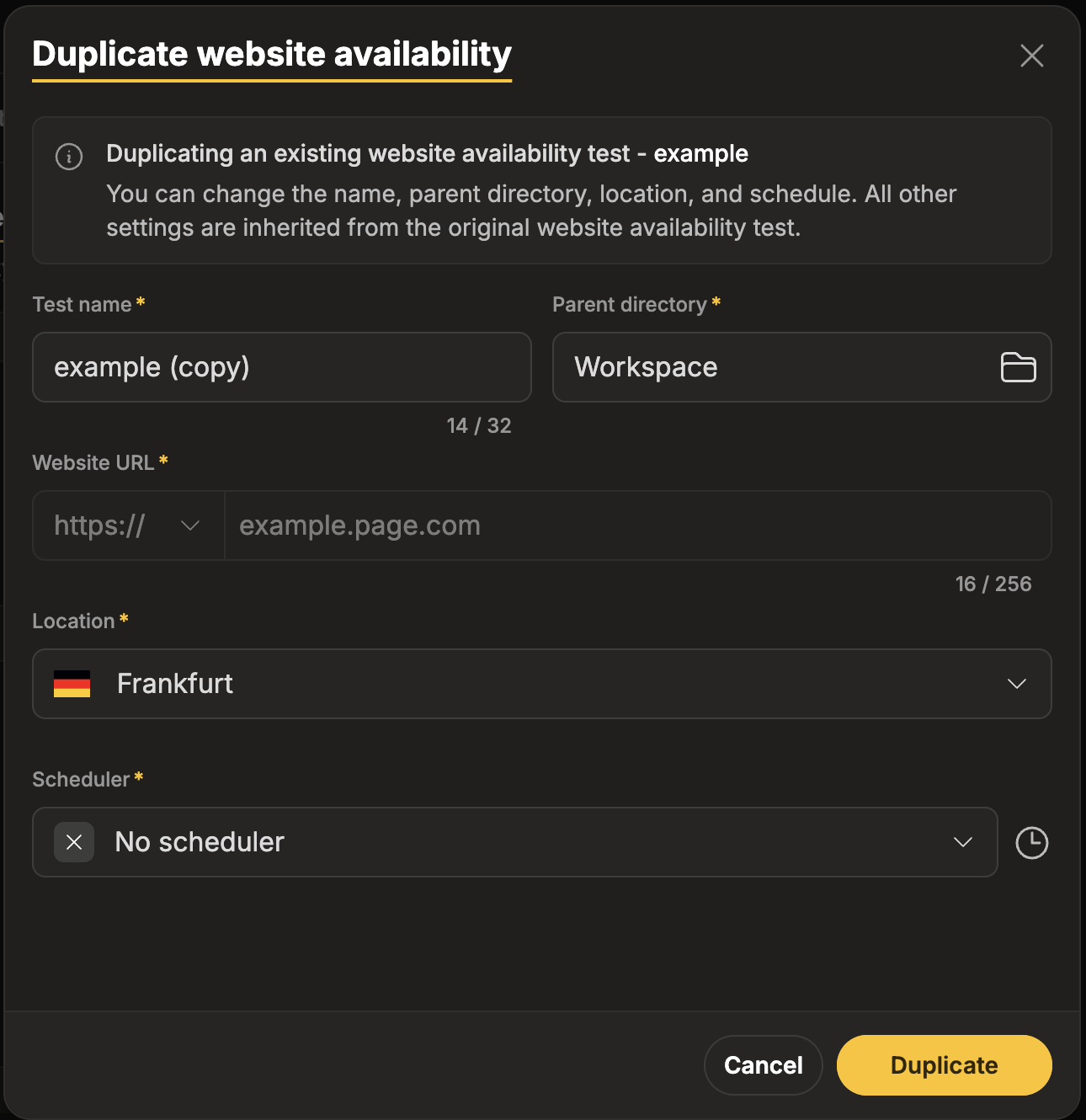
In the Duplicate website availability dialog, review the Name. It is prefilled with a default based on the source - edit it if you want.
Default: “Homepage (copy)” (for a source check named Homepage)
-
(Optional) Adjust Parent directory, Location, or Schedule.
-
Click Duplicate. TestCLIX creates the new test and opens it, ready to run.
Validation rules
Section titled “Validation rules”- The Name is prefilled with <source name> (copy). You can keep it or replace it.
- Name is required and limited to 32 characters. If the default name would exceed 32 characters, it is trimmed to fit - shorten it further if you like.
“Name is required.” “Name must be 32 characters or fewer.”
Error Handling
Section titled “Error Handling”| What happened | What you see | What to do |
|---|---|---|
| Name missing or too long | ”Name is required.” / “Name must be 32 characters or fewer.” | Enter a name of 32 characters or fewer. |
| No write permission | The Duplicate action is unavailable. | Request write access - see Roles & Permissions. |
Best Practices
Section titled “Best Practices”- Name for context, not just uniqueness. With only 32 characters, favor short, meaningful names like
Homepage – EUorAPI health (staging). - Inherit by default, override on purpose. Change a setting only when the duplicate genuinely needs to differ.
- Change location for regional copies. Duplicating per region is the cleanest way to check the same endpoint from multiple places.
Related
Section titled “Related”Does duplicating affect the original Website Availability?
No. The duplicate is fully independent. Changing or deleting it never affects the source, and vice versa.
Will the duplicate include past results?
No. A duplicate starts with a clean history and builds its own results from its first run.